

Taking my Llama 3.3 out for a test drive... well.. more like a walk... a very slow one
I would guess by now most of us have played around with chatGPT or some other LLM and maybe even we've played with some image manipulation.
For me, the next step was to get an LLM loaded on my own machine so I can train it my way, and without always having to hand over money to OpenAI.
So it began. Simple right?
You also probably know that only certain LLM's are open source so after poking around I decided to try my hand at Meta's Llama 3.3 LLM. Yes, Meta... the company I most love to hate for Facebook and other social media products, but what can ya do? I'm sure they'll take this product commercial as soon as they can, but for now I can play with it for free.
The first question is - since I don't have a billion dollar data center, just how can I do this on a home PC? It turns out you don't need the data center, you can download the fully trained version that will run on a home computer as long as it's powerful enough. So just how much power is that?
My PC has a 16C/32T 5950X CPU, 32GB of RAM, a high speed NVMe drive (1TB) and a video card with 6GB Vram. I already knew this was going to be boarder line, but lets forge ahead.
Installing a LLM on a PC is a full on daunting task for AI researchers, geniuses', and crazy people. I guess I fit into the last category.
Fortunately, third party companies have come to the rescue and created user friendly tool and frameworks to help us out. In this case, it's a product called Ollama.
You can download and install Ollama on Windows, Mac, or Linux and then use it to manage the installation of various LLMs like Llama, Mistral, and so on. This is the easy part 🙂
Grab Ollama at: https://ollama.com/ and download for your OS then run the installer. I'm in Windows so for me it installs it and sets it to run. You'll see a little Llama's head in your systray.
Ollama3.3 comes in two versions. A 4 Billion parameter model and a 70 billion. Believe me - start with the 4 Billion.
Open a command prompt (terminal window) and type:
ollama run llama3.3
This will download the 4B model and store it to your machine, then open a chat prompt that looks like this >>>
If you see that, you're in and you can start chatting just like you would with ChatGPT.
You can check to see what models are installed at any time with the command:
ollama list
In the sample below, I'm going to run the model called:
llama3:latest
When you see the chat prompt: >>> You're good to go.
So I asked it the question: "who are you" - see below.
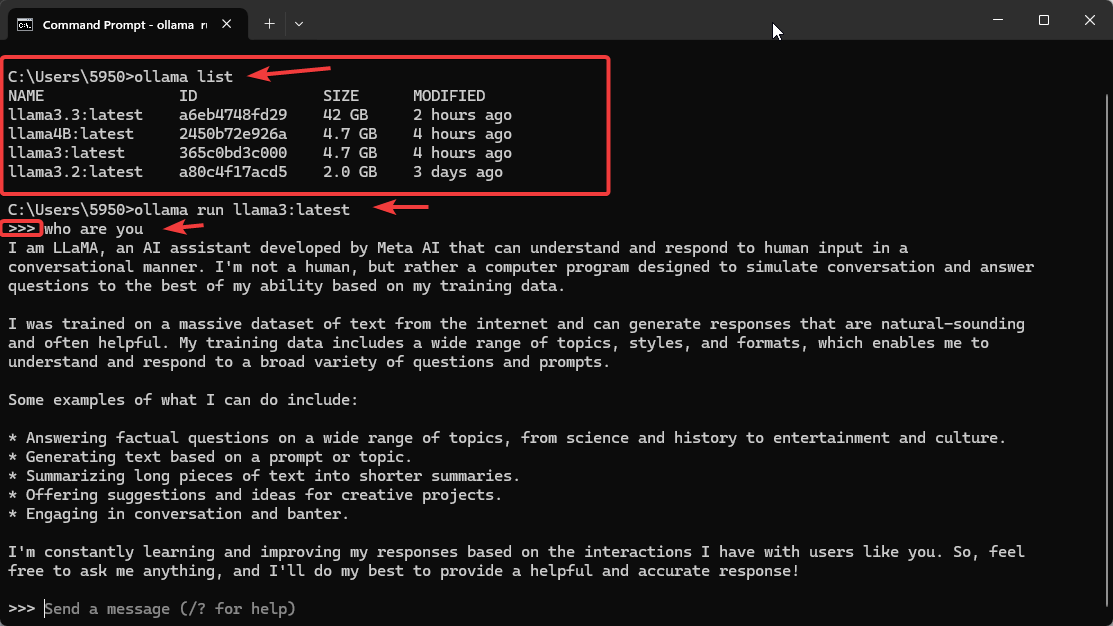
fig.1-1
When you're finished playing with your Llama, simply say:
/bye
Here are some other commands to know: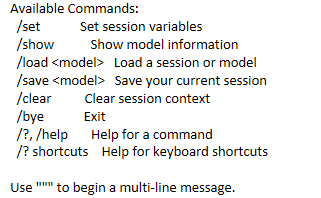
So now, if you're like me you naturally want the latest greatest, so it's time to grab the 70 Billion parameter model. Good Luck 🙂
This is where you'll be wanting a bigger computer. After hours and hours of trying I simply could not get my machine to download the entire model. I had computer resources, but every time the download got about a third of the way in, it would crash and start all over again.
I finally overcame that when I realized the command we used before, the ollama run llama3.3 command not only tries to download it but tries to run it at the same time. My machine just didn't have the balls.
I finally figured out the deal was to force it to just download it with the command:
ollama pull llama3.3
This still took several attempts and numerous retries, but it finally worked and downloaded the large model. Now all I had to do was get it to run. Now the ollama run llama3.3:latest simply runs the model without trying to download it first, but don't worry, your problems aren't over yet 🙂
It took forever to load and consumed every bit of my 32GB of RAM I had and drive my NVMe drive to 100% I/O. I closed down as many apps as I could to free up more RAM, and after quite some time it finally loaded. I'm speculating that the high NVMe activity is simply Windows swapping to the drive as the free RAM was used up.
So I jump online and order more RAM. I upgraded to 64 GB and the full 70 billion parameter model now loads, but it's very slow. When loaded it consumes about 50GB of RAM..
When I gave it the same prompt as I gave to ChatGPT it took over 20 minutes instead of 1 or 2. During that process, it was using about 78% of CPU resources, but almost no drive activity, so obviously the model was totally running in RAM. My underpowered video card was ignored altogether.
So the next step in terms of upgrading hardware is to add more Video power. But the current leader in Video Cards, the NVIDEA 4090 only has 24GB of Vram and as we already know they model needs at least 50 GB. That's not going to cut it.
One solution is to link two 4090 cards together. To "link" two RTX 4090 cards together, you would need to install them in a compatible motherboard with multiple PCIe slots, ensuring proper airflow between them, but you cannot use NVLink to directly link them as Nvidia has removed NVLink functionality on the RTX 40 series GPUs; instead, you would need to rely on software-based multi-GPU configurations within applications that support distributed processing to utilize both cards effectively. With the 4090 cards costing close to $3500 each you're getting close to $10,000 in hardware upgrades.
You can go past the consumer video card arena and start looking at cards specifically designed for AI use like the Nvidia A6000, the A100, or even the H100 cards. But be prepared to open your wallet wide as the A6000 runs in the $6000 to $7000 range, the A100 in the $20000 range, and the H100 in the $35000 to $40000 range.
So now you have to have a business use that can justify the expense. If the data you have to train the AI on is very proprietary, then maybe it's worthwhile, but for most people just trying to learn the technology it's not easily justified.
If you're just trying to learn and understand the technology, then adding a video card like the 40 70 ti super with 16GB of Vram may be the answer. It will speed up your processing, but it will not compete with the online services available. However it may just be fast enough for you to learn and practice AI training on.
Happy computing..
Kerry